Introduction
If you’re comparing AI agent vs chatbot 2026 for support or sales, the real issue is tools, reasoning, and workflow
control — not the label on the product page. That’s why this conversation feels more confusing than it should. The
words sound simple, but the technology underneath is doing very different jobs.
That’s the useful tension here: a lot of products called “AI agents” are barely more than chatbots, and some chatbots
do more than the branding admits. So before you choose one, it helps to slow down and look at what each system is
actually built to do. Once you see the architecture, the decision gets a lot clearer.
Quick Highlights
- Architecture matters more than branding.
- Agents handle multi-step work.
- Chatbots fit narrow, predictable flows.
- RAG and guardrails matter in production.
- Cost depends on resolution, not just price.
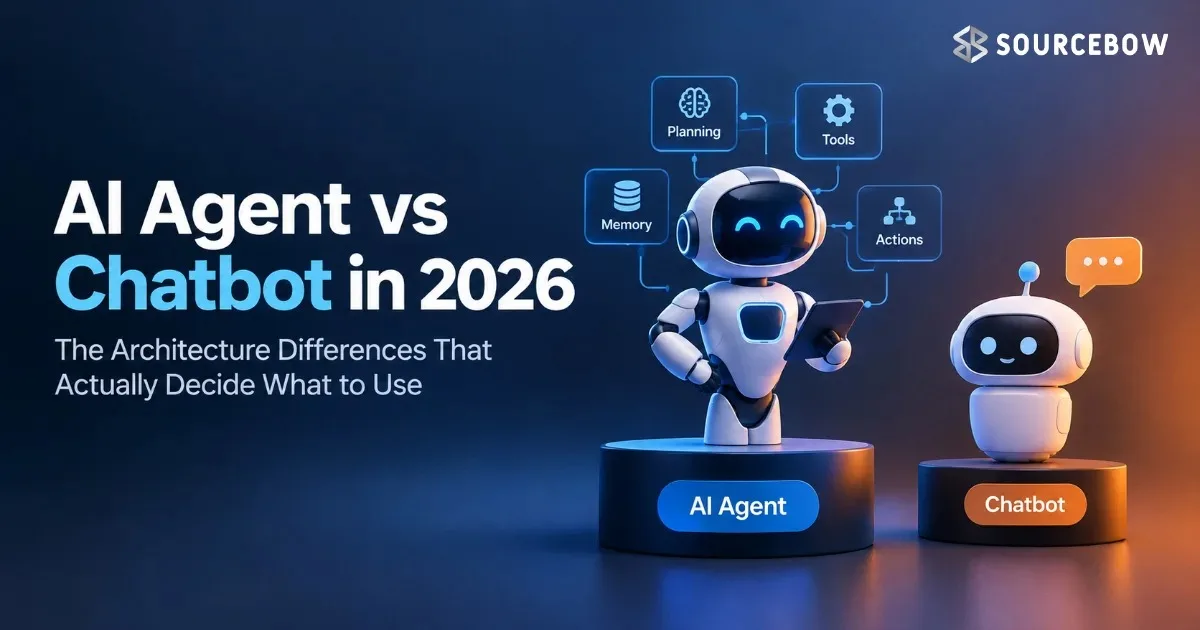
What makes a chatbot, an LLM copilot, or an AI agent different?
The article’s core claim is that these are three different architectures, not just three marketing terms. That
distinction matters because each one handles uncertainty in a different way. One is built to follow rules, one is
built to answer well, and one is built to keep working toward a goal.
Rule-based chatbots use intent classification, entity extraction, and scripted dialogue flows; LLM chatbots use a
language model without autonomous tool use; AI agents add tool calls, memory, and a reasoning loop. In plain
English, that means the first follows a script, the second talks intelligently, and the third can decide and act
across steps. If you’ve ever wondered why one product feels “smart” but still can’t finish the task, this is usually
why.

The autonomy gap is the whole story: left to right, capability and independence increase, and most “AI chatbot”
products in 2026 sit somewhere in the middle. They may use a language model, but they don’t always manage tools or
workflows like a real agent. That middle ground is where a lot of confusion lives.
The three-system spectrum vendors keep collapsing into one bucket
Rule-based chatbot, LLM chatbot/copilot, and AI agent are separated by how they handle a request, not by how polished
the interface looks. A beautiful chat window doesn’t tell you much. What matters is what happens after the user asks
a question.
The spectrum runs from predefined flows to single-turn LLM responses to multi-step execution with observe, reason,
act, and evaluate. That last part is the big leap. An agent isn’t just replying; it’s checking what’s happening,
deciding what to do, doing it, and then evaluating whether the result actually solved the problem.
Why rule-based chatbots break down once the conversation stops being predictable
This is where the older architecture starts losing the plot: it depends on a small, fixed intent set and a rigid
state machine. That works fine when the user says exactly what the script expects. It gets shaky the moment the
conversation wanders, combines topics, or changes direction halfway through.
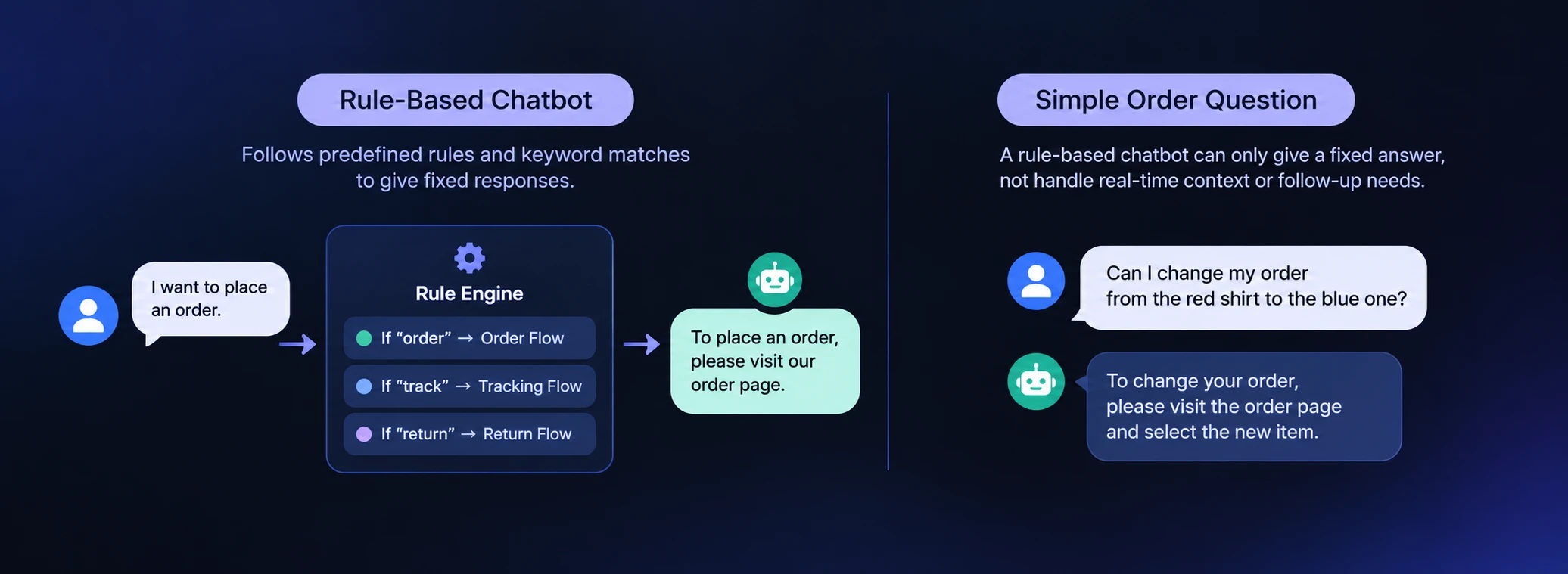
The article points to four failure points — rigid intent taxonomy, no reasoning across turns, brittle entity
extraction, and linear scaling of effort — and gives concrete examples like order status flows and fallback
handlers. Those limitations add up fast. Every new exception means another rule, another branch, another case to
maintain. That’s why these systems often feel fine at first and then get messy as soon as real users start throwing
real questions at them.
That’s why an FAQ bot or appointment scheduler can fit, while messy multi-turn conversations usually can’t. A narrow
task with predictable inputs is one thing. A support issue with missing info, follow-up questions, and a change in
request is another thing entirely.
How the rule-based flow handles a simple order question
The example is intentionally narrow: “What’s the status of order #12345?” becomes intent=order_status and
entity=order_id=12345, then calls order_status_api(12345). It’s clean, tidy, and very easy to understand. That’s the
appeal of this kind of system.
The response is specific too: order #12345 shipped on April 7 and is expected by April 11. No drama, no guesswork, no
extra reasoning. The system just maps the user’s message to a known path and returns the approved answer.
This section also anchors the architecture around NLU, a dialogue manager, and a response generator, plus the
fallback path when the intent is unknown. So if the system can’t confidently classify the request, it doesn’t
improvise; it usually punts to a generic reply or sends the user to a human. That fallback is useful, but it’s also
the sign that the system has reached the edge of what it can really do.
What an AI Agent Does That a Chatbot Cannot
An AI agent is defined by runtime judgment: it can decide what to do next instead of walking a prewrittenpath. That’s the part people often miss. It’s not just “better answers.” It’s a different kind of controlover the conversation and the work behind it.
The loop has four phases — Observe, Reason, Act, and Evaluate — and the article’s exchange example makesthat real with order #7891, laptop SKU-A100, monitor SKU-B200, exchange #EX-442, and a return label URL.Those details matter because they show an agent performing a chain of actions across systems, not justtelling someone what might happen. It’s operating like a coordinator.
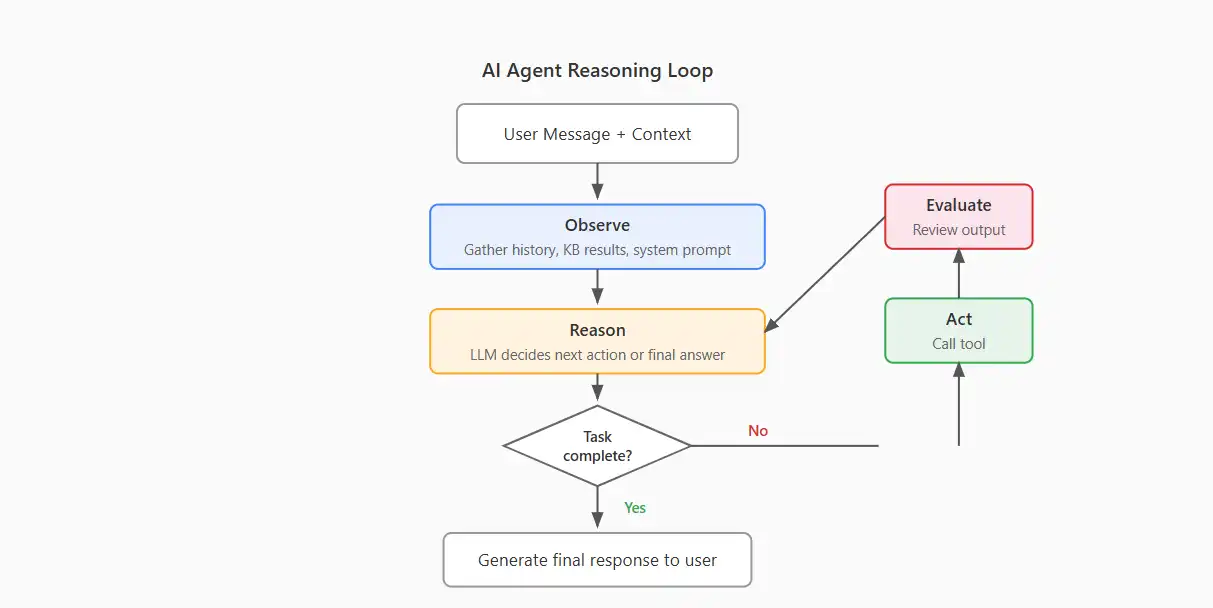
That example matters because no one had to prebuild an “order_wrong_item_exchange_and_return” intent for the agent to handle the case. That’s the big win. A chatbot needs the path designed ahead of time. An agent canoften assemble the path when it’s needed, which is exactly why it feels more flexible in liveoperations.
The order mix-up example shows why multi-step workflow automation matters
The agent first looks up the order using customer_email=”user@example.com” and timeframe=”7d”, then confirms the
wrong item, then creates the exchange, then generates the return label. Each step depends on the one before it. If
any step fails, the agent can adjust, retry, or ask for more information. That’s much closer to how a competent
human support rep works.
The final response says the correct laptop will ship within 1–2 business days, and the monitor can be dropped off at
any carrier location. This is where tool use in AI agents becomes visible: the model is not just answering, it is
chaining actions. It’s a small but meaningful shift from conversation to execution.
When a chatbot still makes sense, and when it mostly doesn’t
The article is blunt here: for most use cases in 2026, a new rule-based chatbot is hard to justify. That doesn’t mean
chatbots are useless. It means the bar is much higher now, especially when users expect systems to do more than just
recognize a few phrases.
There are still narrow exceptions — regulated responses in healthcare disclosures or financial compliance, extreme
cost sensitivity at tens of millions of interactions per month, and legacy systems with no migration path. In those
scenarios, a simple, controlled flow can still be the smartest option. But those are exceptions, not the default.
Outside those edge cases, the default recommendation shifts toward an AI agent. Not because it sounds modern, but
because it tends to handle real customer messiness better. And in support and sales, messy is usually the norm.
The business cases that still favor templates over autonomy
Regulated environments may need deterministic, pre-approved wording. That matters when every phrase has legal or
compliance weight. You don’t want creative phrasing in a disclosure that needs to be exact.
Very high-volume, simple interactions can still make the no-LLM cost structure attractive, especially when the use
case is just checking a balance or confirming a booking. If the conversation never changes shape, templates can stay
efficient. There’s no shame in using the simpler tool when the job is truly simple.
Some teams also simply cannot replace a deeply integrated legacy chatbot right away. That’s just operational reality.
Migration takes time, budgets are finite, and old systems are often buried inside other systems. So the right answer
can be “not yet,” even when the long-term answer is clearly more autonomous.
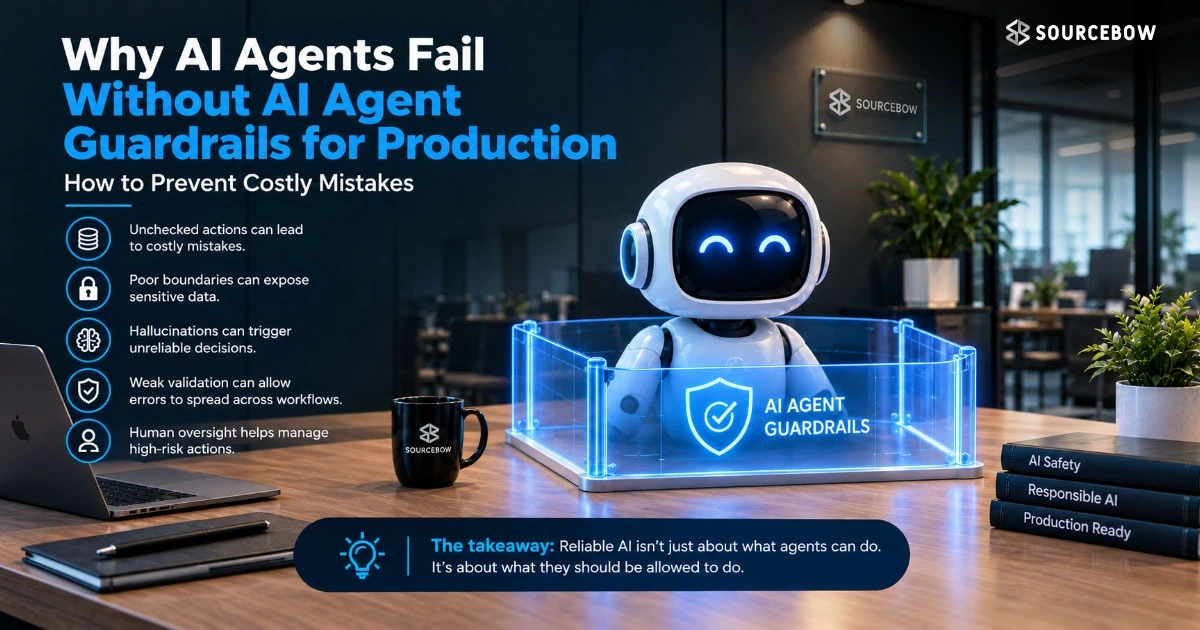
How Production AI Agents Are Controlled Before They Touch Customers
The article treats production as a separate problem from capability: a raw LLM is not enough. That’s animportant point. A model may sound capable in a demo and still be risky in real customer conversations if itisn’t controlled properly.
Three controls stand out — guardrails and behavioral rules, knowledge grounding with RAG, and tool accesswith permissions — and the Quickchat AI Agents example ties them together with source traceability andAPIs/MCP. In practice, that means you’re not just asking whether the agent can answer.
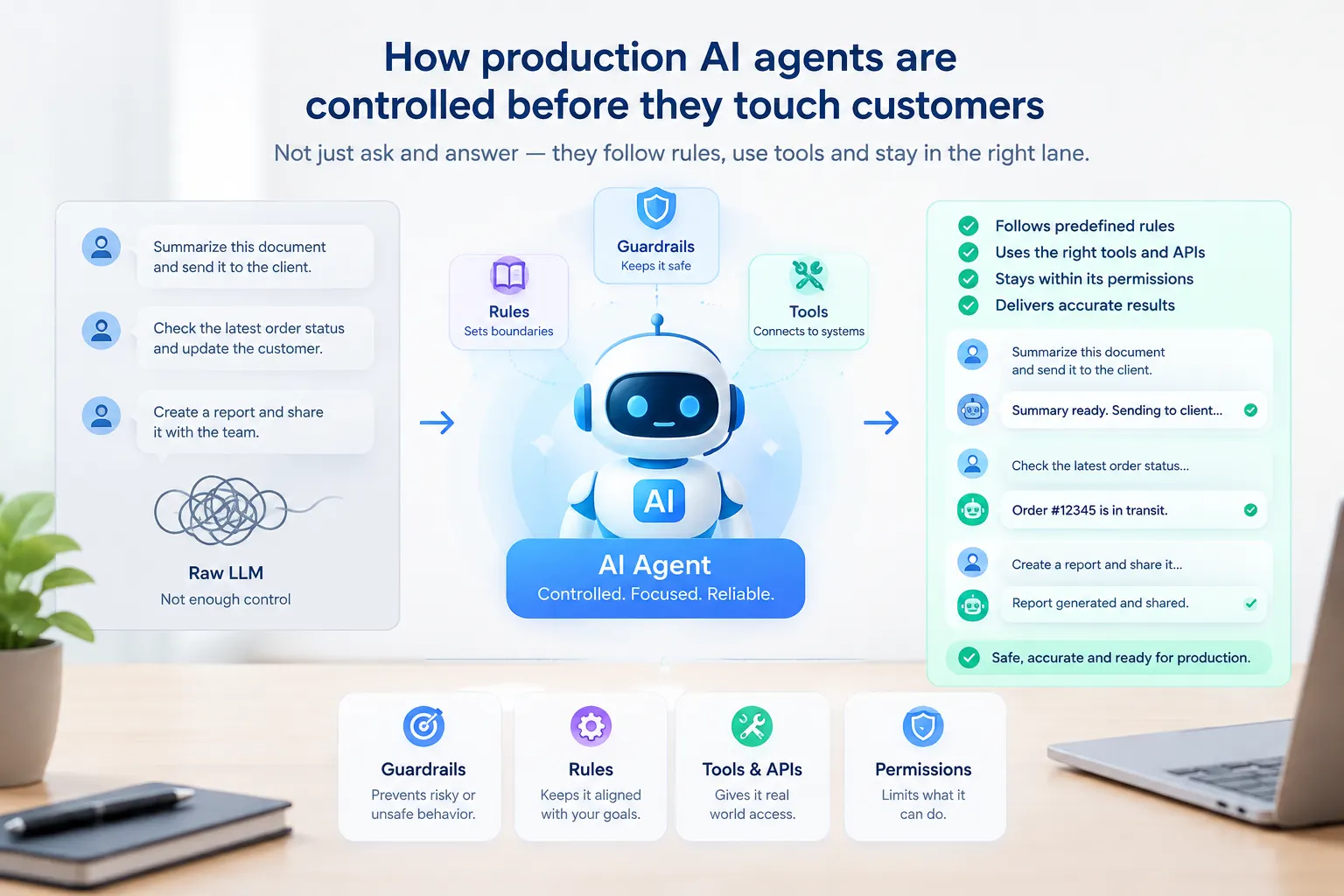
That’s also where AI agent guardrails become operational, not theoretical. They aren’t abstract “bestpractices.” They decide what the agent can talk about, what it can do, and when it needs to stop and escalate.
What guardrails, RAG, and permissions each do
Guardrails decide allowed topics, tone, escalation thresholds, and which tools are available. Think of them like the
rules of the road. They don’t drive the car for you, but they keep the car from doing something dumb or dangerous.
RAG grounds responses in a curated knowledge base and can show which source documents influenced the answer. That’s a
big deal because it reduces guesswork. Instead of relying only on the model’s internal memory, the system checks
trusted content first, which is much safer for customer-facing work.
Tool permissions follow least privilege: a support agent might have read access to orders and write access to
tickets, but not billing modifications. That kind of separation matters more than people realize. If the agent only
has access to what it truly needs, the blast radius stays smaller when something goes wrong.
What the cost and performance trade-offs actually look like
The article does not pretend this is only an architecture choice; economics matter too. A system can be elegant and
still be the wrong choice if it costs too much to run or maintain. So the better question is not just “which is
smarter?” but “which one actually pays off in the real world?”
Rule-based chatbots have near-zero marginal cost but heavy maintenance, while AI agents incur per-interaction cost
from LLM inference and tool execution. That sounds like a simple trade-off, but it’s not. Low per-call cost can hide
high upkeep, and higher per-call cost can still win if the system resolves more issues without human help.
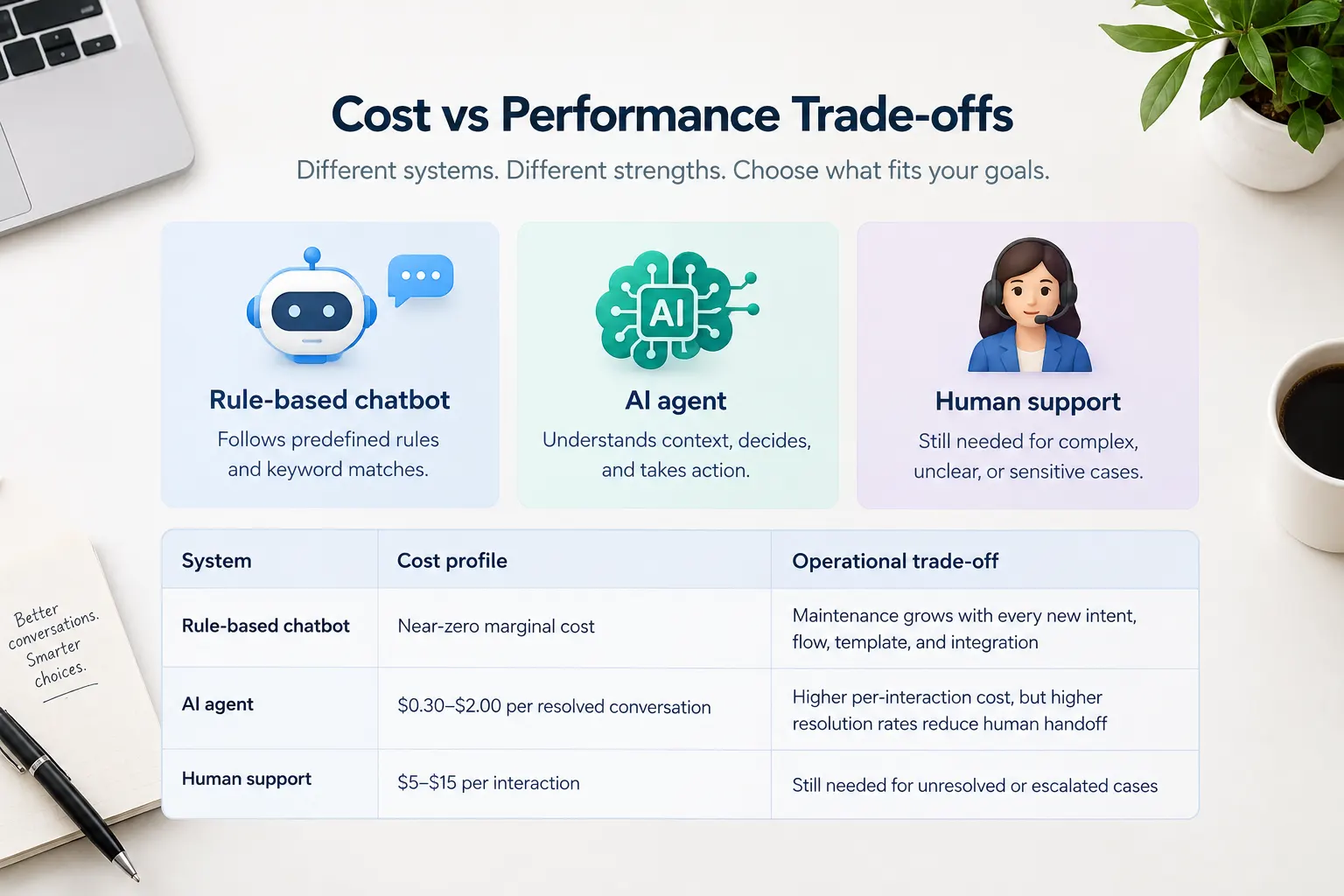
The numbers are concrete: vendors usually price AI-agent resolutions between $0.30 and $2.00, Intercom Fin charges
$0.99 per resolution, Quickchat AI charges $0.50 on its Enterprise plan, Salesforce Agentforce charges $2.00 per
conversation, and Gartner estimates human support at $5–$15 per interaction. Once you compare those numbers side by
side, the real question becomes much more practical: how many conversations does the system finish without
escalation?
| System | Cost profile | Operational trade-off |
|---|---|---|
| Rule-based chatbot | Near-zero marginal cost | Maintenance grows with every new intent, flow, template, and integration |
| AI agent | $0.30–$2.00 per resolved conversation | Higher per-interaction cost, but higher resolution rates reduce human handoff |
| Human support | $5–$15 per interaction | Still needed for unresolved or escalated cases |
The resolution-rate numbers change the math fast
The article says rule-based chatbots may resolve only 40% of requests, while AI agents are reported at 60% to 90%+
depending on domain and knowledge-base quality. That spread changes everything. A cheaper system that resolves fewer
problems can end up costing more overall because people have to clean up the rest.
That is the real cost argument: the cheaper system can still be more expensive if it hands too much work to people.
So the real metric is not just price per interaction. It’s total work removed from the human queue.
What to measure if you want to know whether it’s working
Chatbots and AI agents fail differently, so their metrics need to be different too. That sounds obvious, but a lot of
teams still measure them like they’re the same thing. They’re not. A chatbot is usually judged by whether it follows
the intended path. An agent is judged by whether it actually solves the problem.
For chatbots, the important signals are coverage, fallback rate, and flow completion; for agents, the important
signals are AI resolution rate, cost per resolution, CSAT by AI interaction, sentiment trends by topic, and whether
responses are grounded in accurate sources. Those metrics tell you not only whether the system is working, but how
safely and consistently it’s working.
Traceability matters more for agents because the answer is generated, not simply looked up. If the system gives a
helpful answer, you still want to know where it came from. That’s especially true in support, sales, and regulated
environments where trust is part of the product.
- Chatbot metrics: intent recognition, fallback logs, defined-flow completion
- AI agent metrics: resolution rate, cost per resolution, CSAT, sentiment trends
- Extra agent requirement: source traceability for auditability and trust
FAQ
These are the doubts that usually come up once someone has the basics but still wants to know what breaks in
practice.
Q: Can I convert my existing chatbot into an AI agent?
Not directly, because the architectures are different. The knowledge base and API integrations transfer well, but the
intent taxonomy and dialogue flow definitions get replaced by runtime reasoning. So it’s usually more of a rebuild
than a simple upgrade, even if some of the underlying assets can be reused.
Q: Are AI agents more expensive than chatbots?
Per interaction, yes. But if the agent resolves far more of the 80%+ versus 40–60% gap the article cites, total
support cost can still fall. That’s why looking only at unit price can be misleading. The better comparison is total
cost after deflection and resolution.
Q: Do AI agents hallucinate?
Yes. That is why RAG grounded responses and traceability are treated as production requirements rather than nice
extras. Without those controls, an agent can sound confident and still be wrong, which is exactly the kind of
failure that hurts trust fast.
Q: What about latency?
Chatbots respond in milliseconds, while AI agents usually take 1–5 seconds depending on reasoning steps and tool
calls. That is acceptable for support and sales, but not for every real-time use case. If the user needs an instant
yes-or-no answer in a live moment, latency can still matter a lot.
Conclusion
For AI agent vs chatbot 2026, the practical default is the agent: more flexible, more capable, and usually easier to
justify once the conversation has to do real work. That doesn’t mean chatbots are dead. It means they’re
increasingly the right answer only when the problem is truly narrow and predictable.
If the job is just a fixed response at huge scale, a chatbot can still be the right constraint — but most support and
sales teams should start by asking how much autonomy they actually need. That one question usually reveals the
answer pretty quickly. If the workflow has to observe, decide, act, and evaluate, you probably want an agent. If it
just needs to recognize and respond, a chatbot may still be enough.