Introduction
Cloud computing models can look similar at first, until you slow down and ask a pretty basic question: who owns the infrastructure, what do you actually get, and what are you still responsible for? That’s where the differences start to matter. A monthly per-user SaaS fee, for example, is not the same thing as just any subscription software, even if the billing feels similar on the surface.
Learn how cloud computing models work across IaaS, PaaS, SaaS, public cloud, private cloud, and hybrid cloud. Once you separate the labels from the real responsibilities, the whole topic gets a lot less slippery.
Quick Highlights
- Ownership and control are the real deciding factors.
- Public, private, and hybrid cloud answer different needs.
- IaaS, PaaS, and SaaS remove different layers of work.
- Virtualization helps cloud, but it isn’t the same thing.
The real question is less “what is cloud?” and more “what kind of control, access, and responsibility does each model leave with the customer?” If you keep that in mind, the rest starts to line up in a way that actually makes sense.
Cloud computing models explained: ownership, access, and how much control stays with you
Cloud computing is defined here as services delivered from servers in a network: on demand, shared across tenants, elastic when demand changes, and measured as you use them. That sounds technical, but the idea is pretty simple. You’re not buying a box of software and calling it a day. You’re using computing power, storage, or applications over a network, and the provider is doing some of the heavy lifting behind the scenes.
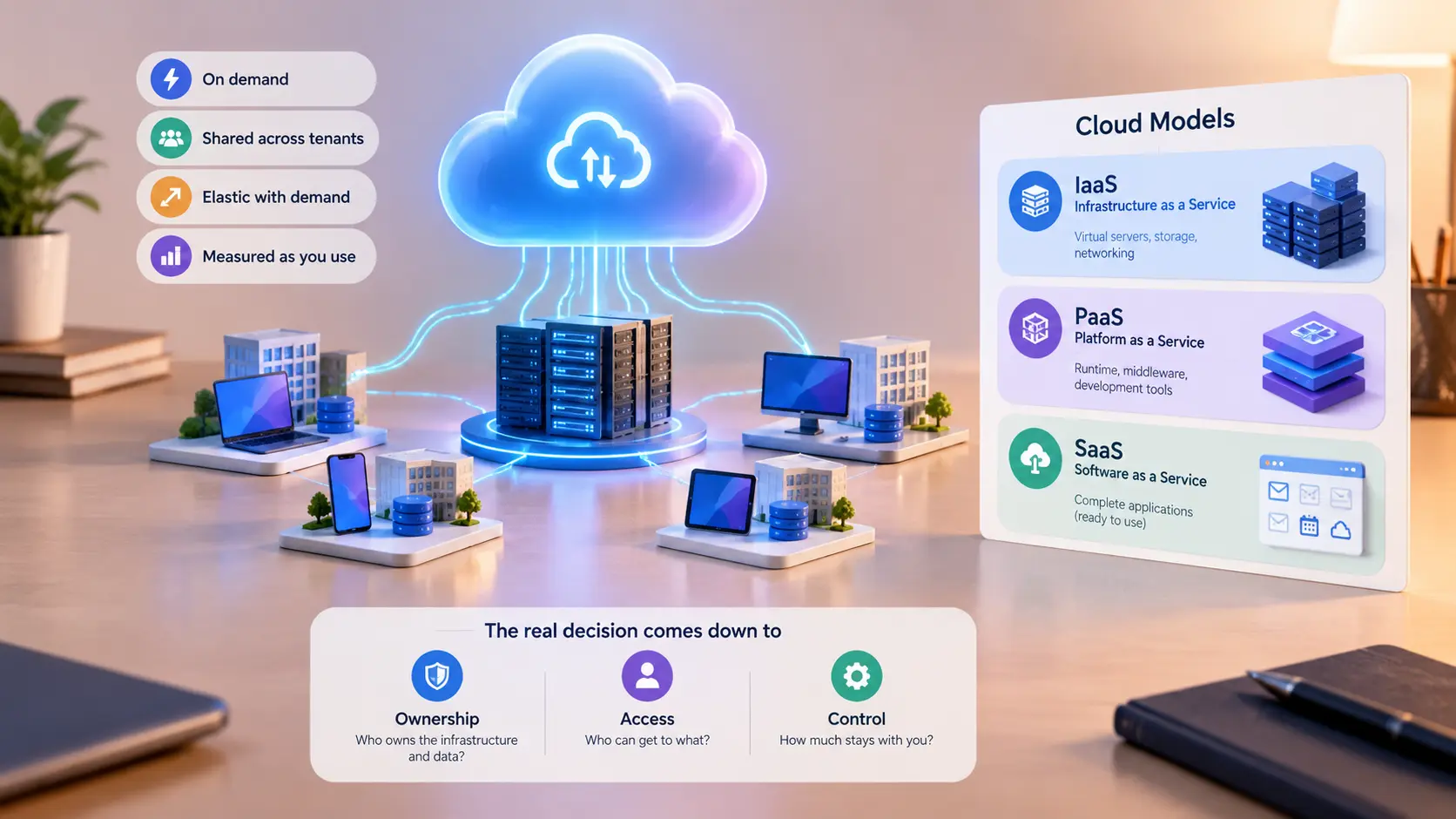
The split that matters is whether the service is organized by infrastructure ownership or by the architecture the user sees — generic computing instances, a platform for applications, or complete application software. In other words, some cloud computing models are about where the hardware lives, while others are about how much of the stack the provider has already handled for you.
Public cloud, private cloud, VPC, community cloud, and hybrid cloud are really different answers to the same question
Public cloud is the default most people mean when they say “cloud,” and it is offered to any number of customers by many providers. It’s the broadest, most familiar option because you’re sharing provider-managed infrastructure with lots of other users, even if your data and workloads are logically separated.
Private cloud is built for a single customer, while still aiming for elastic scaling and resource sharing; a virtual private cloud is an isolated set of servers inside a public cloud, usually linked by VPN to an enterprise network. That’s a useful distinction because a VPC can feel private without actually being private-cloud infrastructure in the strict sense.
Open to the general public, subject to security restrictions.
Single-customer infrastructure, often used by large enterprises.
Isolated servers inside a public cloud, connected by VPN.
Shared by a defined community, such as health care or government agencies.
A mix of public and private cloud resources.
So if you’ve ever seen people use these terms like they’re interchangeable, now you know they really aren’t. They all answer the same basic question, but each one lands on a different balance of access, isolation, and flexibility.
Why regulated industries keep looking at community cloud and hybrid cloud
Community cloud is built for multiple customers who need shared trust, especially where data is regulated and sensitive. Think of it like a neighborhood co-op for computing: the members have something important in common, so they share a space that’s designed around those needs instead of around the general public.
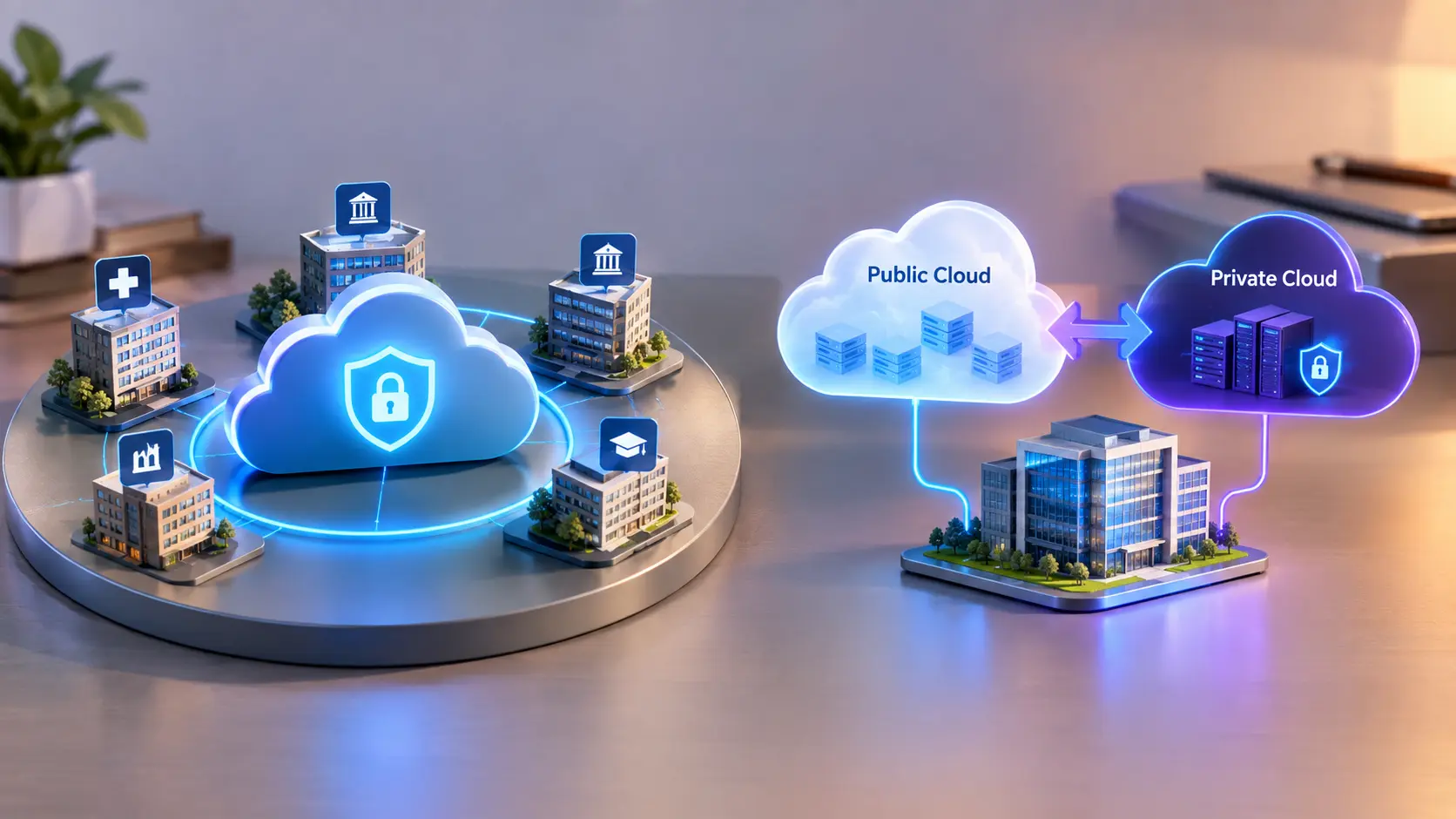
Hybrid cloud exists because not every workload belongs in the same place: some resources can be public, while others stay internal. That split is often the practical answer when security, trust, and internal control all matter at once.
Now, that doesn’t mean hybrid cloud is automatically better. It just means reality is messy. Many organizations want the cost and convenience of public cloud without giving up the tighter control of a private environment, and hybrid gives them a way to hold both at once.
IaaS, PaaS, and SaaS: the part where the cloud model becomes a product choice
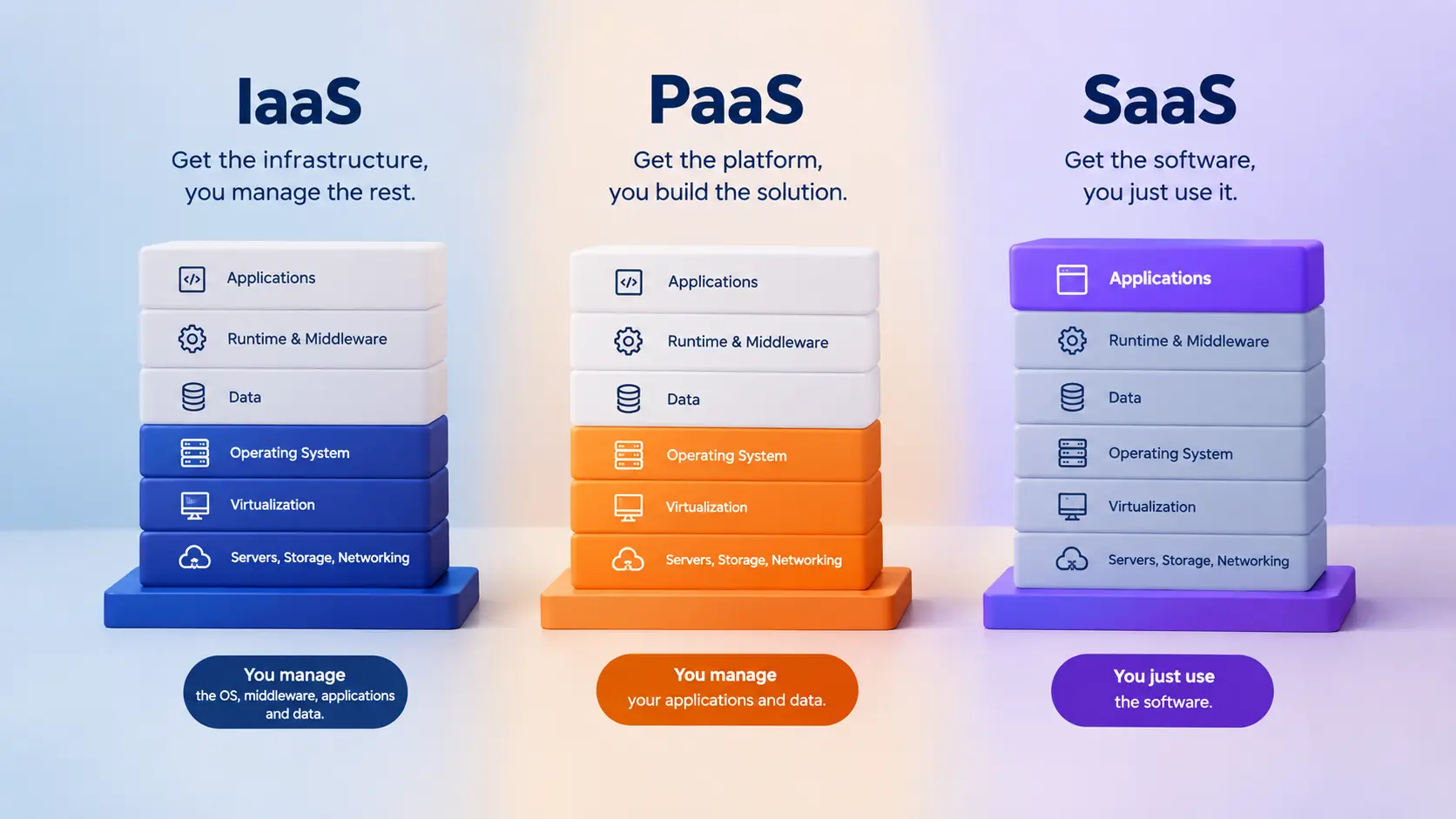
The service model is where the differences get more tangible, because each layer removes or preserves a different amount of work for the customer. This is the point where cloud stops being a vague idea and starts becoming something you actually choose for a project, a team, or a business.
IaaS, PaaS, and SaaS are not just labels; they describe whether you are getting infrastructure, a platform, or the software itself. That one distinction changes how much time you spend managing systems versus building something useful on top of them.
IaaS gives you the building blocks: virtual machines, storage, containers, and serverless computing
Infrastructure-as-a-Service is the most basic service layer in this stack, because the provider supplies the underlying computing resources rather than the finished application. You still have work to do, but you’re starting with a ready-made foundation instead of raw hardware in a rack somewhere.
The raw examples in this model are virtual machines, storage, containers, and serverless computing. That mix matters because it shows IaaS isn’t just one thing; it’s a set of building blocks that let you assemble an environment with a lot more flexibility than traditional on-premises setups often allow.
If you’ve ever wanted to rent a workshop instead of buying the whole building, that’s kind of the feel of IaaS. You get space, tools, and utilities, but you still decide how to use them.
PaaS gives you a platform, but not the keys to the operating system
Platform-as-a-Service usually ties you to a specific set of programming languages, tools, and applications, which means the environment is shaped for building rather than administering. That’s a huge relief if your real job is creating and shipping software, not babysitting servers all day.
Generic command-line access to the operating system is typically not allowed, and the same virtual machines may be shared by multiple users; Google App Engine and many web hosting services fit this pattern. In practice, that means you trade some low-level control for speed and simplicity, which is often a very fair trade if your team wants to move quickly.
| Model | What you get | Notable constraint or example |
|---|---|---|
| IaaS | Virtual machines, storage, containers, serverless computing | Provider handles the infrastructure layer |
| PaaS | A computing platform for apps | No generic OS command-line access; Google App Engine |
| SaaS | Complete application software | Provider handles infrastructure and upgrades |
SaaS is the clearest “use it, don’t run it” model
Software-as-a-Service means the application itself is delivered as the service, and the provider handles infrastructure, upgrades, and the software instance. That’s why SaaS feels so easy from the customer side. You log in, use the tool, and usually don’t think much about what’s happening underneath.
The customer mostly just uses the software, which may run in a customer-specific virtual machine, shared software instances, or even a single application server instance serving multiple customers. That flexibility is part of why SaaS has become so common: the user experience stays simple even when the backend architecture changes.
Subscription basis
Monthly fee per user
Not all subscription software is SaaS
Software on customer premises sold as an annual subscription — increasingly common
Lower initial costs for customers and smoother run-rate income for vendors and their investors
And that last point is easy to miss. A subscription doesn’t automatically mean SaaS. The software might still live on your own premises, with the provider simply charging in a modern recurring way. So the billing model and the service model are related, but they’re not the same thing.
Cloud vs. virtualization: why one is a platform choice and the other is a technical layer
Virtualization lets many logical computers run on the same physical hardware, and that makes it a core enabling technology behind cloud services. It’s one of those behind-the-scenes innovations that quietly changed everything, because now one machine can behave like many separate machines. But virtualization alone does not guarantee the cloud
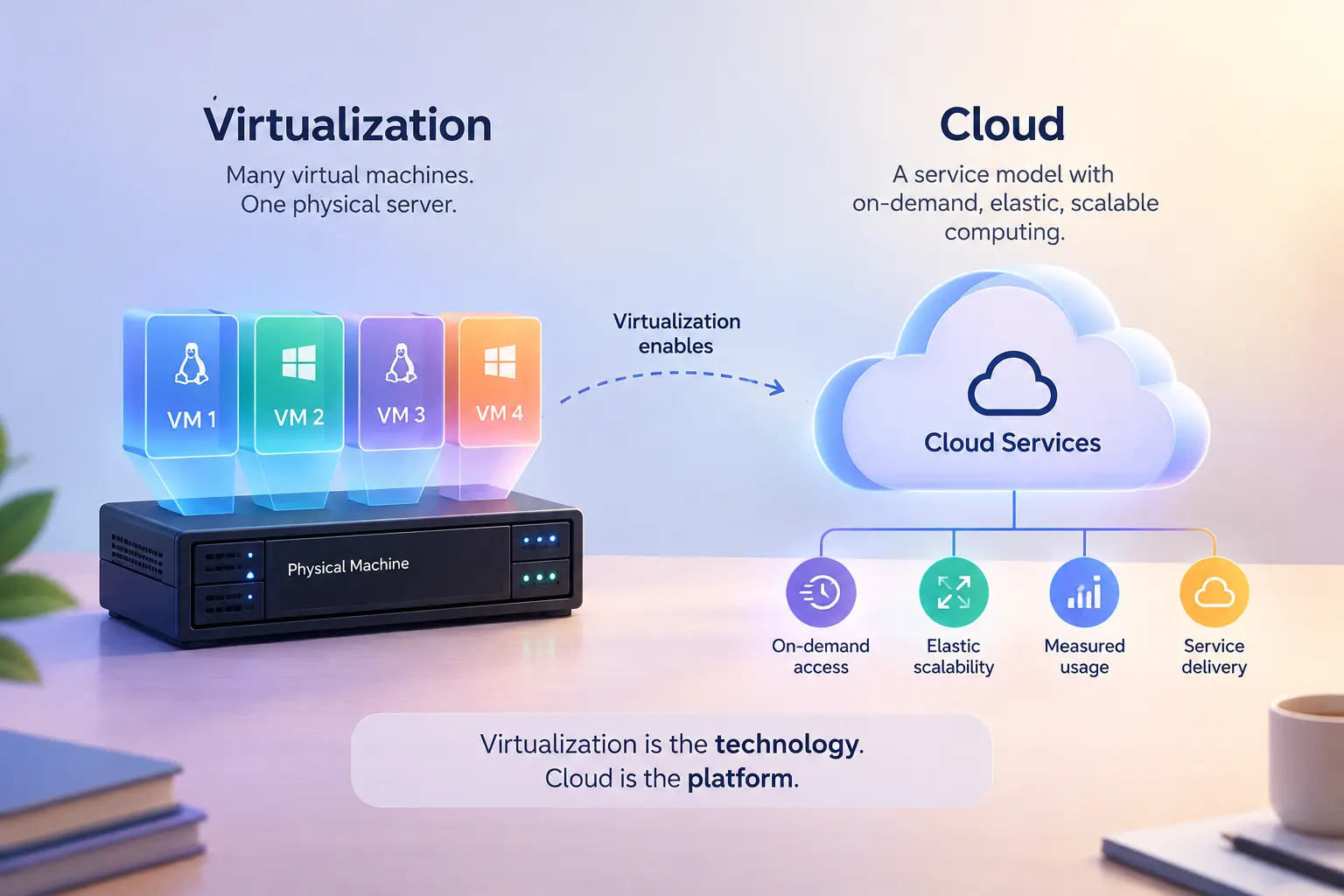
features people usually mean, especially elastic scalability. You can virtualize servers without offering on-demand service, measured usage, or the broader delivery style we associate with cloud computing.That is why the distinction matters: cloud is the service model; virtualization is one of the mechanisms that can support it. It’s a little like comparing a delivery service to the trucks it uses. The trucks matter, sure, but they’re not the whole business.
FAQ
Q: What is the difference between public cloud and private cloud?
Public cloud serves many customers from shared provider infrastructure, while private cloud is reserved for one customer only. Private cloud can still offer elastic scaling and resource sharing.
Q: Is a virtual private cloud the same as a private cloud?
No. A virtual private cloud is an isolated set of servers inside a public cloud, often connected to the enterprise network by VPN. It can feel internal, but it is still built on public-cloud infrastructure.
Q: Why is SaaS not the same as subscription software?
SaaS means the provider runs the application, handles upgrades, and delivers it as a service. Subscription software can also be software on customer premises, especially when sold as an annual subscription.
Q: How is cloud different from virtualization?
Virtualization is the underlying technology that lets many virtual machines share physical hardware. Cloud adds service characteristics like elastic scalability and measured access, which virtualization by itself may not provide.
Conclusion
The point of cloud computing models is not the acronym — it is choosing the right mix of control, access, and operational burden for the work in front of you. Once you see that, the labels stop feeling abstract and start acting like useful decision tools.
If you are comparing options, start with who owns the infrastructure, then work outward to whether you need IaaS, PaaS, SaaS, or a blend of public, private, hybrid, or community cloud. That’s the practical way to make a choice that fits real needs instead of just following whatever sounds most modern.