Nano Banana Pro Is Quietly Changing How Visuals Are Created Online
There’s a new name floating around in the creative tech space, and it has a bit of a funny ring to it. Nano Banana Pro. Behind the playful title sits something quite serious, though. It’s Google DeepMind’s latest image generation and editing model, built over Gemini 3 Pro. And the early noise around it already hints at a shift in how visuals, diagrams, ads, and digital mockups get created.
The goal is pretty simple. When someone has an idea, the gap between imagination and a clean, studio-quality visual should be almost invisible. No complicated tools, no long steps, just a few words turning into something that actually looks usable and polished.
That’s the promise Nano Banana Pro is trying to hit.
A fresh way of creating visuals with Nano Banana Pro
Nano Banana Pro isn’t only about making pretty pictures. The model leans on Gemini 3 Pro’s reasoning skills and its ability to stay grounded with real-time Google Search. That means the visuals don’t just look nice—they follow real-world facts.
Imagine someone planning a small workshop and needing a quick weather update chart. Or a learner trying to understand a recipe but needing a simple diagram instead of a long block of text. The model can take that data and turn it into a clean infographic without going off-track. No vanishing into random details, no guesswork.
And because it uses real-time knowledge, the visuals feel more reliable, almost like an assistant who double-checks the facts before handing the final graphic.
Readable text and typography using Nano Banana Pro
One of the hardest things for many image models has always been text. Letters melt, words get twisted, and longer lines look like a puzzle.
Nano Banana Pro tries to fix that mess. It generates clear, readable text right inside images—short taglines, long paragraphs, even multi-language copy with different fonts or textures. And it does this without turning the text into weird shapes.
For anyone who has spent time editing posters or thumbnails, this bit alone feels like a small relief. No need to erase strange letters or adjust the spacing by hand. The text shows up the way it was imagined.
Creative control and virtual studio options in Nano Banana Pro
The model doesn’t stop at simple generation. It also lets users blend up to fourteen images into a single, consistent composite. This is helpful when trying to create character stories, mood boards, or brand visuals where everything needs to look like part of the same world.
The consistency part is quite interesting. It can keep the look of up to five people across multiple images. So characters don’t randomly change their face shape or suddenly swap identities. Anyone who has seen AI models generate the same character twice knows how crazy those changes can get. Here, the likeness holds up.
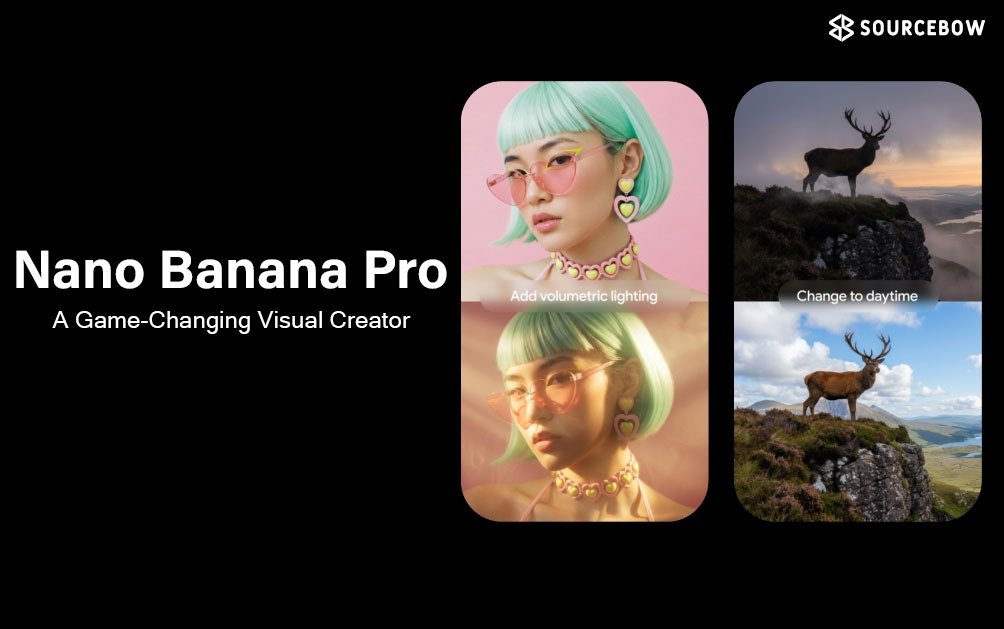
And then there’s the studio-level control—camera angles, lighting mood, focus depth, color grading. These things are usually locked behind professional editing tools, where every small change takes time. Here, they appear like simple settings waiting to be moved around. It almost feels like stepping into a mini digital studio without needing the heavy equipment.
High resolution support also helps. The drafts begin at 2K and can scale up to 4K, which makes the output good enough for campaigns, deck presentations, or even film pre-visual work.
Transparency and traceability built into Nano Banana Pro
AI-generated images can easily disappear into the internet without context. Google tries to handle this with SynthID, a digital watermark hidden inside the image. It’s not visible to the eyes, but it’s baked into the pixels.
There’s also a small visible “sparkle” watermark for those using the free or Pro tiers, while Ultra users get the option to remove it. And an interesting part is the reverse feature—upload an image into the Gemini app and it can detect whether that image came from Google AI.
With so many visuals floating around everywhere, this kind of transparency feels important. It gives a way to keep track of what’s real, what’s generated, and where it all came from.
Where Nano Banana Pro shows up across Google tools
The model isn’t locked inside a single tool. It already appears in different corners of the Google ecosystem.
- Inside the Gemini app under Create Images
- Google Ads creative asset generation
- Slides and Vids in Google Workspace
- Gemini API, Google AI Studio, Vertex AI
- Google’s Flow for storytelling and filmmaking
It’s interesting to see a model shaped for images being used inside a storytelling environment, but the control options make it fit quite well.
Who benefits most from Nano Banana Pro
Designers and brand creators probably get the most immediate value. When visuals need consistency—whether in style, color mood, or character likeness—the model removes a lot of repetitive tasks. Instead of manually adjusting slight changes every time, the system takes care of those corrections.
Educators can use it too. Turning facts and data into diagrams makes learning materials less dense and more visual. The model’s reasoning ability plays a big part here, since it can keep the information accurate.
Global teams benefit from the multi-language text support. Campaigns often need localized versions, and having clean typography inside images in different languages can save a good amount of time.
Marketers working with ads or product visuals get another advantage—the ability to blend multiple images and keep their brand elements steady. No odd mismatches. No disappearing logos or swapped colors. Everything stays on-brand.
A small, lived-in thought about Nano Banana Pro
There’s something almost relaxing about how simple the process becomes. Usually, building a clean visual requires lots of tiny changes—fixing shadows, adjusting focus, or matching colors manually. With this model, those steps feel lighter. Not perfect, but genuinely helpful. Like moving from a cluttered work desk to one where everything is already lined up.
The name Nano Banana Pro might make it sound like a joke at first, but the tool underneath is anything but. It carries a mix of creativity and strict factual grounding, which is rare in many visual models.
Wrapping up with Nano Banana Pro
Nano Banana Pro feels like a quiet shift. Not loud, not dramatic but important. It blends creativity with accuracy, gives more control to everyday users, and keeps transparency in place. Whether for design, learning, branding, or just experimenting, the model opens a smoother path for people who want visuals without wrestling with heavy software.
The tool doesn’t magically replace creativity. It just helps ideas reach the screen a bit faster, a bit cleaner. And that small change can matter a lot when working on something that needs both imagination and clarity.