Introduction to a Playful AI Trend
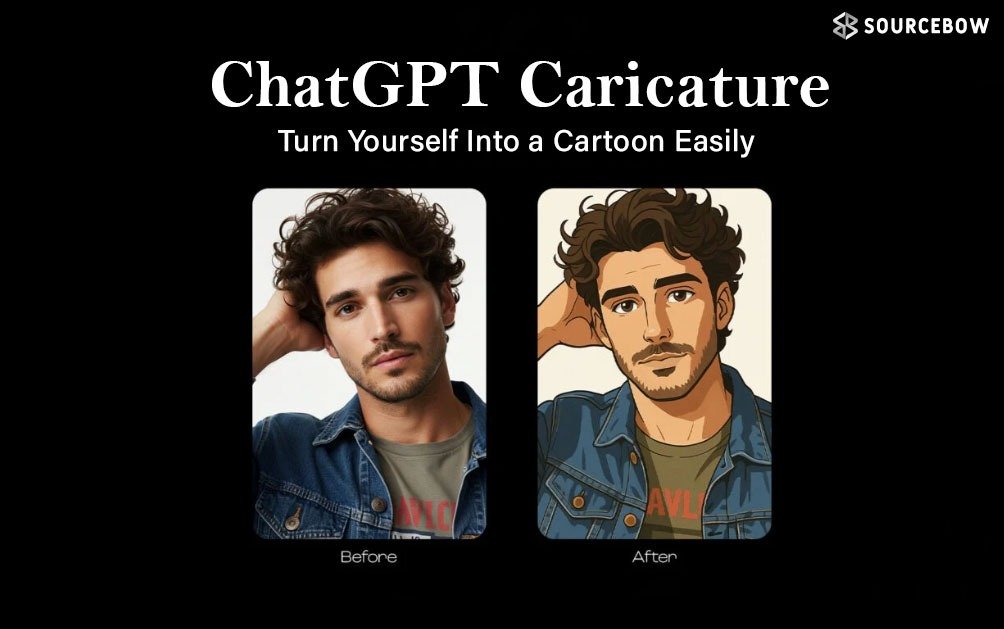
There’s a fresh wave sweeping social feeds: real photos turned into exaggerated, cartoonish versions of the people in them. The driver? ChatGPT caricature and other AI tools that can pretty much turn a regular selfie into a playful caricature in minutes. It’s art, it’s tech, and it’s surprisingly approachable.
No art degree required, no expensive software, just a curious prompt and a dash of imagination. From teachers and journalists to office workers, lots of folks are sharing their AI-made cartoon selves and loving how quickly the result captures personality with a wink.What makes this trend feel different from a simple filter is the level of exaggeration paired with enough realism to still recognize the person.
The caricature isn’t just a doodle; it’s a stylized portrait that nods to daily life—your job, your setting, your quirky details—while keeping things light and shareable.
What makes this trend tick
Before caricatures, there were dozens of AI image trends that came and went. Why is this one sticking around? Here’s the quick read:
- Immediate, low-friction results: Upload a photo and prompt, and a toon version appears in minutes. It’s quick feedback that fuels quick shares.
- Personalized imagery: The AI emphasizes familiar features and settings, so the result feels like “you” with a punchy twist rather than a generic cartoon.
- Relatable storytelling: A caricature can tell a story about work, hobbies, or mood—think a journalist with a notebook or a coder in front of a bright screen filled with code.
- Low barrier to experimentation: Free or affordable prompts let people try different looks without a big commitment.
All of this adds up to a trend that’s not just about a cute image; it’s about sharing a moment of personality in a format that’s easy to digest, remix, and discuss online.
Step-by-step: How to turn yourself into a caricature
Trying the trend is straightforward. Here’s a simple path to your own AI caricature, designed for beginners and curious minds alike:
- Log in to Chat GPT or an associated platform offering caricature generation.
- Upload a clear photo where your face is well-lit and visible. A straight-on shot usually works best, but side angles can be fun too.
- Enter a prompt like: “Create a caricature of me.” The more details you add, the more precise the result will be.
- Include detail about your character (role), what you’re wearing (outfit) and what environment/setting you will be in (environment).
- Example: “I’m a Below are some ideas for how to modify an image your first draft so you can make it better. There are many ways to improve a character sketch — adjust or quote another person’s work of art (or type). For example: “The first copy was not the right size for me but when I enlarged the image it didn’t look right so I got my two copies (the old one and the new version) like someone would also refer to one of these two versions.”
Continue to save and publish your caricature — Keep using it as a profile image, add it as part of a photo story, create artwork from it or use as an addition to newsletters as well as presentations, etc.
Important: Free services may limit the number of times to create (look to generate a few images a day), while memberships allow for more creative
flexibility (more than that) to create (6-12+ new images). In general, using clearer instructions help provide better results from AI since the type and quality of response is determined by the individual’s interaction history and prompt(s).
Tricks and suggestions to get great results:
Presumably, the prompts establish a connection between you and an animated character. With this in mind, below are examples on how to use specific types of suggestions to create your caricature:
- “Draw me as a tech employee at an office that is very bright and modern. The caricature should have my big smile and exaggerated large headphones.”
- “Draw me as a cartoon journalist with a desk full of notebooks. The exaggerated features should be in my eyes and all of the colors should still be bold and friendly.”
- “Draw me as a goofy caricature with my casual hoodie, drinking coffee, my laptop, and a background filled with doodles.”
- “Include close details in the caricature such as my hair, glasses, and a particular attachment with a light-hearted and humorous personality.”
- “Make sure that I am still recognizable, but choose to exaggerate one feature (e.g., a smile or eyebrow) to make it professional.”
Helpful hints for better prompts:
- Be clear about the type of mood you would like (playful, serious, curious) and type of environment the caricature will be in (office, studio, outside).
- Give clear descriptions of clothing, properties or equipment to help the person create a better caricature within the scene (laptop, notebook, equipment associated with the field).
- Limit or boost color intensity to fit where the image will be used (profile pics vs banners).
Real-world uses and things to watch
Caricatures aren’t just fun to create; they have practical, everyday applications. Here’s how people are making the most of this trend:
- Profile picture images that represent you with a funny, exaggerated caricature-style twist (even with added filter effects applied to them).
- Written communication concepts that can give written content more personality and help create a fun approach to subjects that seem otherwise boring or unapproachable.
- Source and portfolio pictures of yourself that are statement pieces within a sea of other photographs, yet capture who you are and continue to carry an air of validity about them.
- Will be found in the classroom as a fun cartoon character headshot among other items on the slide or handout during product training or general education.
Although the final product can be very entertaining to create and share, please remember to consider your usage rights and exclusivity when it comes to using any digital assets created through this process. Remember that what you share online is created for your enjoyment and interactively, to have fun in capturing another fun look, while allowing others to create their own fun caricature copies to post next to yours.
Reference image guide: represents a brief overview of the process used to create a caricature image.
| Step | Activity | Tips and Suggestions |
|---|---|---|
| 1 | Upload a clear, quality image of yourself to the caricature image platform. | Use an image with adequate natural light, that can easily be identified as you. |
| 2 | Write a description of the caricature image that includes emotional state(s), setting(s), and any particular features that you would like to see on your caricature. | Think about what you want your character to look, feel, and/or be like. |
| 3 | Review your caricature image and modify factors such as brightness, colour, and/or emotion until you are satisfied. | Examine the facial features of your caricature to confirm there aren’t any misrepresentation issues with your caricature. |
| 4 | Once your caricature is fully created and has been reviewed as described above, it is now time for you to store, share, and/or use an image of yourself in the following four areas: | Your profile, banner, post, etc. |
Final thoughts along with a reflective questions.
Ultimately, the trend of creating caricatures from your phone and posting them online is a way not only to interact with and play with AI in how it depicts your personal style and everyday life, but also serves as a reminder that technology is
capable of turning our life experiences into visual representations — quickly, playfully, and most importantly with unexpected outcomes. And although creating your own caricature is free, you can have it created in such a way that it either matches or complements your own professional image, or simply allows you to explore your playful side by creating a cartoon character of yourself that is completely different from what you would normally create.
So, if you were to create a caricature of yourself/type of art that represents you, would it be a contemporary style office, a traditional school/classroom setting with pen & paper, or a completely imaginative style with vivid colour palettes? Create something fun & share it! By sharing your creations, you may inspire other people who are just getting into using AI as a tool to help create artwork.