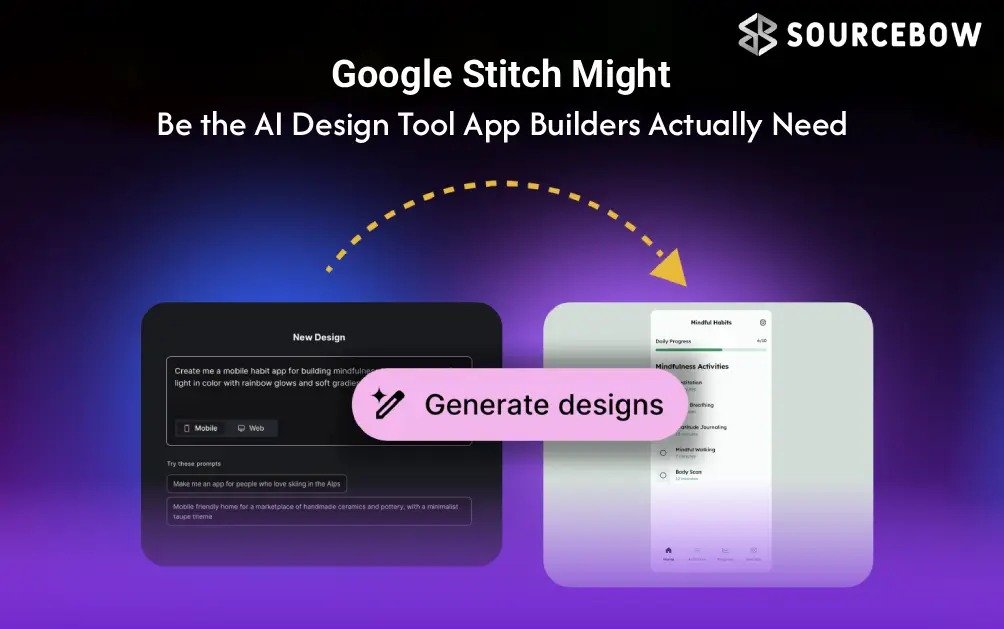
If you’ve ever watched a messy idea blossom into a rough app concept in a coffee-fueled sprint, you know that moment when speed and clarity finally click. Google Stitch is built to chase that feeling. It’s Google’s new AI-native experimentation platform and design canvas that promises to transform your natural-language prompts into high-fidelity UI mockups and functional designs, all in a single, seamless flow. No more staring at empty screens and wondering where to start. Google Stitch is meant to turn your vague visions into something you can actually see and test, right away.
Think of Google Stitch as a friendly design partner who understands you. You describe a concept or business idea in plain words, and Google Stitch translates it into a visual, interactive canvas. It’s not just pretty pictures either. It links screens to create interactive prototypes and even helps you manage a portable design system so your brand looks consistent as you scale. In practice, that means you can go from idea to a testable prototype faster than you might expect, which is exactly the kind of leverage many product teams crave in the wild world of early-stage development.
Quick Highlights
- Describe your app idea in natural language and watch it shape a visual UI in real time
- Connect screens into interactive prototypes with just a few clicks
- Export editable layouts to Figma and generate CSS/HTML on demand
- Voice control to tweak designs and iterate by talking
- Free to start with daily credit resets at midnight and English-only access for now
Before you run in with big visions, a few practical guardrails are worth noting. Stitch is currently offered as a free experiment, with usage governed by daily credits that reset at midnight. It’s meant for people 18 and older and operates in English. Availability is tied to regions where Gemini services are supported, so you may see differences based on location. The promise is clear: you get ready-made design layouts that you can customize, and you can export those layouts straight into real tooling ecosystems. It’s a bet on speed and iteration, without surrendering the control designers need to keep their craft intact.
What Stitch Is Really For
Look, Stitch isn’t billing itself as a cure-all for all design problems. It’s an accelerator, a tool to turn fuzzy ideas into concrete visual contracts—things you can test with real users or share with teammates. For solo designers, it can shave hours off early discovery and ideation. For product teams, it can shorten the cycle from
concept to prototype, providing a shared canvas that both designers and developers can understand. The idea is simple: you say what you want, Stitch renders a believable interface, and you start refining from there. It’s not about replacing human judgment; it’s about giving your imagination a quick, sturdy frame to work within.
How It Works In Plain English
Rather than starting from a blank page, you feed Stitch a description of your app or concept—like a social planning tool for local communities or a lightweight dashboard for a new product line. The AI-native canvas then shows you mock-ups and interactive screens that you can rearrange or tweak. The system can connect screens to form an
interactive prototype, so you can feel the flow and test how it would actually feel to use the finished product. Stitch is excellent for providing immediate feedback on design proposals from frontline staff to non-tech savvy stakeholders because they will be able to immediately see what a finished project will look like versus just imagining it.
In addition to visualizing designs, Stitch can generate and export both CSS and HTML code that is fully compatible with Tailwind-style tools. As a result, you can copy and paste the underlying code to use it in Figma or export a design directly from Stitch into Figma while maintaining the editability of parametric components. This is important since it significantly reduces the number of design iterations caused by communication errors during design translation.
Features You Should Care About A Quick Overview
The following are some of the most important features of Stitch that are commonly utilized in real-world applications:
- AI-native design canvas allowing users to convert natural language into UI layouts
- Interactive prototypes by linking between screens and altering flows during prototyping
- Direct export to Figma with editable components created from parametric component models
- CSS and HTML code generation, including Tailwind support
- Hands-free layout adjustment via voice control
- Model Context Protocol (MCP) compatibility for use with other AI coding programs outside of Stitch
- Access to Stitch is available for free by using a limited number of credits on a daily basis; English only at this time; and must be in a geographic area where the Gemini Service will have operations.
Stitch is quite an elegant tool that incorporates both worlds of exploration in an early design sketch along with physical outputs that are testable, usable by developers for handing off to engineers. It’s not just about creating a final product page all at once; it’s also about estimating an idea visually, getting confirmation from your
teammates, and refining it based on their input — all before anyone hand-makes a final version of each screen.
Who can use Stitch? Is it free?
Stitch has been positioned by Google as being free to start, thus allowing for experimentation with little inhibition to your curiosity. With a daily credit usage model, you can experiment using multiple prompts, layouts and prototypes without immediate cost to you. However, you must remember that daily credit balances reset each day at midnight and therefore should manage your experiments accordingly if you are working within different time zones or short sprints. Access is English-only for now and targeted at users who are 18 and older. Availability is currently aligned with Gemini-service regions, so if you’re in a place where Gemini is supported, you’ll likely find Stitch ready to play with. This is a classic “early access” scenario: powerful enough to spark creativity, but not a fixed, widely deployed enterprise product just yet.
It’s worth noting that Stitch’s export and integration promises aren’t window dressing. The ability to push designs into Figma with editable elements, plus the added capability to generate CSS/HTML code, can shorten the bridge between ideation and implementation. In practical terms, that means you can hand a designer, a frontend developer, or a product manager a functioning prototype with a shared visual language—and you can start tweaking the code behind the scenes as needed. For teams already wading through cross-tool handoffs, Stitch could become a unifying layer that keeps everyone on the same page.
Limitations To Watch For
As with any early-stage tool, there are caveats. Using Stitch for experimentation means you’ll likely see improvements and ongoing development of the product as it learns from actual use of the platform. Some international teams might find the language barrier to be an issue. With the daily credit model, planning your experiments ahead of time may help you get the most out of the testing process rather than assuming you can use it indefinitely. You will require a stable internet connection as a lot of Stitch depends on online services, and depending on how complicated your idea is, the quality of AI-created mockups may vary.
Real-World Scenarios Where Stitch Shines
Imagine you’re pitching a new app concept to stakeholders who need to “see it” before you write a line of code. You describe the core features, and Stitch lays out a visual prototype that captures the user journey. You then tweak the flow with voice commands, maybe add a few CSS styles, and export the design to Figma to hand off to a designer. Or, you’re a solo founder sketching a minimal viable product and you want a quick, testable interface to validate a hypothesis with potential users. Stitch gives you something tangible to gather feedback on—without months of heavy lifting. In this context, Stitch is less about being a perfect designer and more about being a fast, reliable ideation partner that helps you move from concept to testable artifact more smoothly than you might be able to do with pen-and-paper sketches alone.
Where This Fits Into A Modern Workflow
For teams that have many tools to manage daily activities, Stitch can be a starting point for a more integrated workflow. For designers, the ability to create and export layouts from Stitch in Figma provides the opportunity to use AI-generated layouts as a starting point to add the human touch that only comes with experience and aesthetics. For Developers, the output of CSS/HTML, particularly with support for Tailwinds, can help move from design to implementation much quicker by minimizing handoff issues between design and development and accelerating iterations on products. For Product Managers, Stitch can also be used as a way to communicate what is intended, providing a
shareable and interactive concept to demonstrate intent, rather than requiring stakeholders to interpret static wireframes or lengthy text-based design briefs. The promise is simple: you can go from an idea to a testable, shareable prototype in a fraction of the time you’d usually spend on early-stage design.
Numbers, Bits, And The Cultural Side Of AI Design Tools
Beyond the practicalities, Stitch signals a shift in how teams think about ideation. By advancing our understanding of how to use natural language commands, we have less difficulty testing our unconventional ideas for creating designs. Furthermore, we can easily revert back to our more traditional designs if necessary. This experimentation is important in industries that regularly change the expectations of consumers or that will be able to take advantage of repeated rapid iterations, as it will provide us the potential of gaining a competitive edge.
However, as we have the ability to explore better ways to document, there will be increased responsibilities (such as using a mature approach) with the resulting creation of new ideas, and ultimately how we will document them as final designs, as well as ensuring we provide a good user experience for the final product by producing designs that will appeal to many different audiences, including those with disabilities, and to do this by creating inclusive designs.
The Short Version Why Stitch Might Change Your Design Game
Stitch isn’t a polished, finished product, and it isn’t pretending to be. It’s a pragmatic experiment that gives designers, developers, and product people a powerful, early-stage canvas: turn words into visuals, connect screens into a prototype, and export or generate the code you need to move forward. If you’re the kind of creator who values speed, iteration, and collaboration across teams, Stitch can feel like a real-time co-pilot for your ideas. Using machines does not mean outsourcing your decision-making but rather speeding up the parts of that decision-making process where you can see value in quickly visualizing and having a shared understanding of what’s going into the decision (and who’s contributing to it).
We hope you will take a moment to consider your design bottlenecks as well as how Stitch may assist you in overcoming these challenges. Would you like to see your concept developed faster? Would you like to have a more streamlined workflow from concept to prototype, with less back-and-forth communication between the design team and development team? If so, Stitch offers a compelling, accessible entry point. It’s free to start, it invites you to experiment with reasonable limits, and it’s designed to feel intuitive even if you’re not yet fluent in design tooling. If you’ve got 20 minutes to spare, you could sketch a concept, generate a prototype, and export something ready to share with teammates. That’s a rare win in the often slow-moving world of product ideation. So, are you ready to give Stitch a try and see how your next idea takes shape in minutes rather than hours?
One last note: if you’re curious about the practicalities, try crafting a simple app concept and describing it to Stitch with care. You’ll quickly feel where the tool shines and where your human touch still matters most. The technology is advancing fast, but the best part remains the same: a good idea deserves a clear, shareable image, and Stitch helps you produce that image with less friction than you might expect. What will you build first if you had a smarter canvas at your disposal?
In the end, Stitch is less about replacing your design instincts and more about amplifying them. It’s your ideas, now with a spark that helps others see them sooner. If you try it, tell us what you discovered: did it speed up your ideation? did it reveal a path you hadn’t considered? your feedback helps shape how these AI design tools evolve in the wild world of real projects.